


On this page
Your ICP decides who you contact and what AI writes for them. A sharp ICP is the biggest single driver of reply rates. It matters more than copy, more than volume and more than tooling.
Watch: build an ICP-first LinkedIn sequence
What a good ICP includes#
| Part | Weak | Strong |
|---|---|---|
| Industry | "Tech companies" | "B2B SaaS selling to mid-market" |
| Company size | "SMBs" | "20–200 employees" |
| Geography | "Global" | "UK, Ireland, Netherlands" |
| Titles | "Decision makers" | "Head of Sales, VP Sales, Founder (under 50 employees)" |
| Trigger | — | "Hiring SDRs, or raised funding in the last 6 months" |
| Pain | "Wants growth" | "Pipeline depends on the founder's network. No outbound motion." |
| Disqualifiers | — | "Agencies, companies with a 10+ person SDR team" |
Write it in Prosyo#
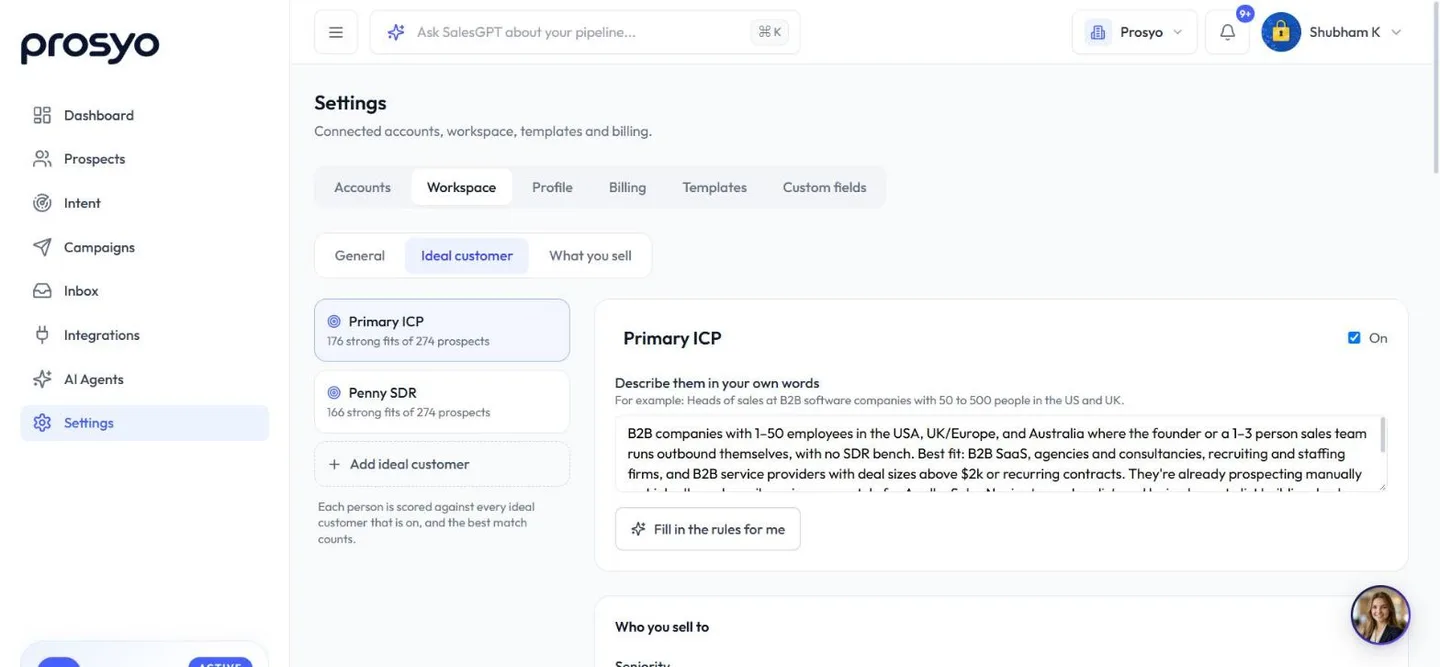
Put it in Settings → Workspace → General, in the Ideal customer profile box, and click Save changes. It's the same text as Describe them in your own words on your first ideal customer under Settings → Workspace → Ideal customer, so you can write it in either place. If you keep several ideal customers, AI writing and research use the description of the newest one that's switched On. Owners and admins can edit it. Plain language works best:
We sell to B2B SaaS companies with 20–200 employees in the UK and EU.
Buyers: Heads of Sales, VPs of Sales, and founders at companies under 50 people.
Best fit: they're hiring SDRs or recently raised funding, and pipeline still
depends on the founder's network.
Not a fit: agencies, companies with large SDR teams, B2C.
AI uses this when it drafts a whole campaign (Generate with AI), writes campaign steps (Write with AI) and AI comments on posts, researches prospects (the ICP fit in enrichment), and writes Intent research and first messages. Fit scores from 0 to 100 come from the rules below.
Turn it into rules that score every prospect#
Right after onboarding, Prosyo turns your ICP sentence into ideal-customer rules for you. Check and refine them in Settings → Workspace → Ideal customer, where Prosyo scores every prospect and Intent lead from 0 to 100 for fit, with the reasons.
- Write a sentence and choose Fill in the rules for me, or set the rules yourself: seniority, department, job titles that fit and that don't, industries, company size, locations and company keywords.
- Never a fit lists companies, websites and job-title words that always score zero, such as customers, partners or competitors.
- What matters most sets how much each part counts. When something about a person is unknown, that part counts for half rather than nothing. Places, job titles and industries are understood in many languages and at any level: "Europe" covers someone in Berlin, and "Geschäftsführer" is read as a C-level role.
- You can keep several ideal customers. Each person's best match counts.
- What your replies say suggests roles and industries that reply more often than average.
- Who counts as High-intent ICP sets the score thresholds and the morning email with new High-intent ICP people. It goes to owners and admins at 9:00 in your workspace time zone, only on days with something to act on.
Automatic delivery#
Automatic delivery chooses who gets your plan's included Intent people:
- Deliver people with a fit score of at least: Anyone showing interest, 40 · loose match, 50 · good match (recommended), or 70 · strong match only.
- Spread my included people across the month: on by default, so you get fresh people every day. High-intent ICP people always arrive right away.
Owners and admins can edit. Saving updates fit scores within a few minutes and delivers any waiting matches straight away.
Find your ICP from data you already have#
- List your 10 best customers: fastest to close, happiest, highest value.
- Write down what they have in common: size, industry, title of the buyer, the trigger that made them buy.
- List 5 bad-fit customers: churned or painful to serve. Those are your disqualifiers.
- Share your notes with SalesGPT and ask: "What do these customers have in common, and which roles should I focus on?"
Turn the ICP into Sales Navigator filters#
| ICP part | Sales Navigator filter |
|---|---|
| Industry | Industry |
| Size | Company headcount |
| Geography | Geography |
| Titles | Current job title + Seniority level |
| Trigger | Changed jobs in past 90 days · Posted on LinkedIn in past 30 days · Company headcount growth |
Save each combination as a separate list, for example "ICP-A: UK SaaS Heads of Sales". See Import from Sales Navigator.
Slice it: one message per slice#
Don't send one message to your whole ICP. Split it into slices where the same message fits everyone:
- by title (founders care about different things than VPs),
- by trigger (a job changer vs a company that's hiring),
- by region (timezone, language, examples).
Each slice gets its own list and campaign. Compare them in Reports.
ICP examples#
Marketing agency
Founders and heads of marketing at D2C e-commerce brands doing $2M–$20M revenue in the US, running paid social in-house, with no dedicated performance marketer.
Dev shop
CTOs and founders at seed to Series A startups (10–60 people) in Europe, hiring 2+ engineers, building on React/Node.
B2B consultant
COOs and heads of operations at 50–500 person logistics companies in the UAE and Saudi Arabia, currently hiring for operations roles.
Local business service
Owners of dental and physiotherapy clinics with 2–10 locations in [city/region].
Review it monthly#
Every month, look at who replied positively and who booked meetings. Tighten the ICP toward them and remove slices that never reply.












