


On this page
AI credits pay for Prosyo's AI work. Most AI actions cost 1 credit. Enrichment, personalised first lines and Intent cost a little more. For actions with a fixed price, you see the cost before you confirm.
What uses credits#
| Action | Credits |
|---|---|
| Enrich a prospect (Enrich only) | 5 per prospect |
| Write a personalized first line or icebreaker (Write personalized line) | 2 per prospect |
| Intent: unlock an extra person beyond your plan's monthly amount | 10 |
| Intent: research and personalised messages | 10 per person |
| Intent: extra person plus research | 20 |
| Generate a campaign with AI | 1 |
| Write with AI / Improve with AI on a step | 1 |
| AI-generated comment on a post (at send time) | 1 per comment |
| Inbox AI draft | 1 |
| Inbox AI summary | 1 |
| SalesGPT message | 1 |
| Help me write this (agents, skills and Penny SDR setup) | 1 |
| Agent Penny chats, scheduled tasks and agents | Depends on the work (see below) |
| Penny's computer, each minute beyond your plan's included minutes | 2 per minute |
| Reading files and websites into Knowledge | By size (see that guide) |
| Create a personalized video in 720p | 10 per video |
| Create a personalized video in 1080p | 15 per video |
No AI credits needed: viewing, filtering and exporting Intent; the Intent people included in your plan each month; form fills, sign-ups, people who message you first and people still warming up in Intent; first-message drafts on Intent → Today; reopening Intent research within 30 days; automatic reply labels in Inbox; sending; and imports. Your plan's other allowances still apply.
Each message you send to SalesGPT, including a rewrite request, uses 1 credit. When you ask Claude or ChatGPT to unlock, research or enrich, they show the credit cost and wait for your yes first.
Refunds: if an AI action fails, the credits come back automatically. That includes Intent research that could not be completed.
How Penny uses credits#
Agent Penny chats, scheduled tasks and agents use credits according to the amount of AI work needed to read information and prepare the result. Longer research can use more than a short drafting request. Waiting for an app to respond or for you to approve a card has no time charge.
- A failed answer is not charged. Work that finished successfully earlier remains in your history.
- Each answer has a credit limit. If an answer reaches it, Penny stops, keeps what she has done and asks you to reply “continue”.
- A scheduled task's AI credit limit per run and an agent's Credits limit per run control how far it can work before it stops or pauses for you to continue.
- Some available credits may be held while work is running, then the unused amount is released.
- Credits charged by Apollo or another connected app belong to that service and are separate from your Prosyo balance.
Check Settings → Billing → Credits for the recorded charge. SalesGPT keeps its separate 1 credit per message price; the action prices above remain separate too.
Where your workspace has Penny's computer, Penny SDR includes 200 minutes a month and Penny SDR All-in 600. Each minute beyond those uses 2 credits. Adding files or websites to Knowledge has its own reading cost, shown in that guide. Making a video uses the quality-based price above; see Send personalized videos for when the charge is applied.
Credits included#
| Plan | AI credits included |
|---|---|
| Trial | 25, once |
| Starter | 100 a month |
| Multichannel | 250 a month |
| Agency / Team | 250 a month per seat |
| Enterprise | Unlimited |
| Penny Agents (add-on) | 2,000 more a month |
| Penny SDR (add-on) | 7,500 more a month |
| Penny SDR All-in | 12,000 a month |
| AppSumo plans | One-time credits that depend on your tier; tier 6 also gets 250 a month per seat |
Plan credits reset each billing cycle; unused ones don't carry over. They're spent first, before any credits you bought. When a plan ends, its remaining plan credits expire and show in the history as Unused plan credits expired. Credits you buy, and lifetime-deal credits, never expire.
Check your balance#
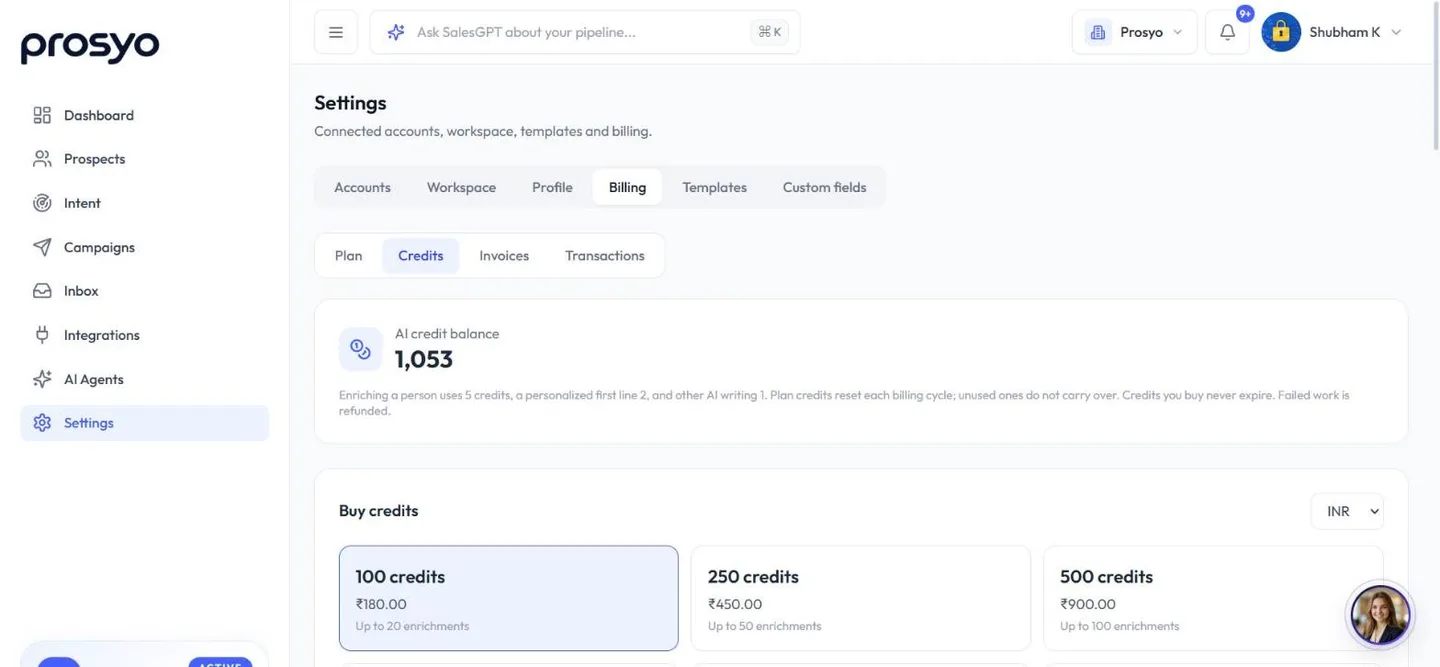
Go to Settings → Billing → Credits to see your balance and a history of every credit used, granted and refunded.
Buy a credit pack#
Need more? Owners and admins can buy a one-time pack on a paid plan:
| Pack | USD | EUR | INR |
|---|---|---|---|
| 100 credits | $2 | €2 | ₹180 |
| 250 credits | $5 | €5 | ₹450 |
| 500 credits | $10 | €10 | ₹900 |
| 1,000 credits | $20 | €20 | ₹1,800 |
| 2,500 credits | $45 | €45 | ₹4,050 |
| 5,000 credits | $80 | €80 | ₹7,200 |
Up to 1,000 credits, each credit costs $0.02 (€0.02 or ₹1.80). The 2,500 and 5,000 packs cost less per credit. Credits you buy never expire.
- Go to Settings → Billing → Credits.
- Under Buy credits, choose a currency (USD, EUR or INR) and a pack.
- Click Continue to payment and complete checkout. If tax applies, the total with tax shows before you continue. Credits are added as soon as your payment is confirmed.
In a client workspace, the agency buys credit packs. During the trial, packs aren't available yet: choose a plan to top up.
Buying packs every month? Upgrading from Starter to Multichannel gives 150 more credits every month, plus email. Compare plans.
Make credits go further#
- Enrich only the list you're about to contact.
- Research only the Intent people you plan to reach out to. Reopening their research within 30 days is free.
- Write sequence copy once with AI, then save it as a template.
- Use Inbox filters (free) before you ask for AI summaries.












