


On this page
A campaign is one sequence + one audience + one set of sending rules. Each campaign has four tabs: Sequence, Audience, Sending & safety and Reports.
Create it#
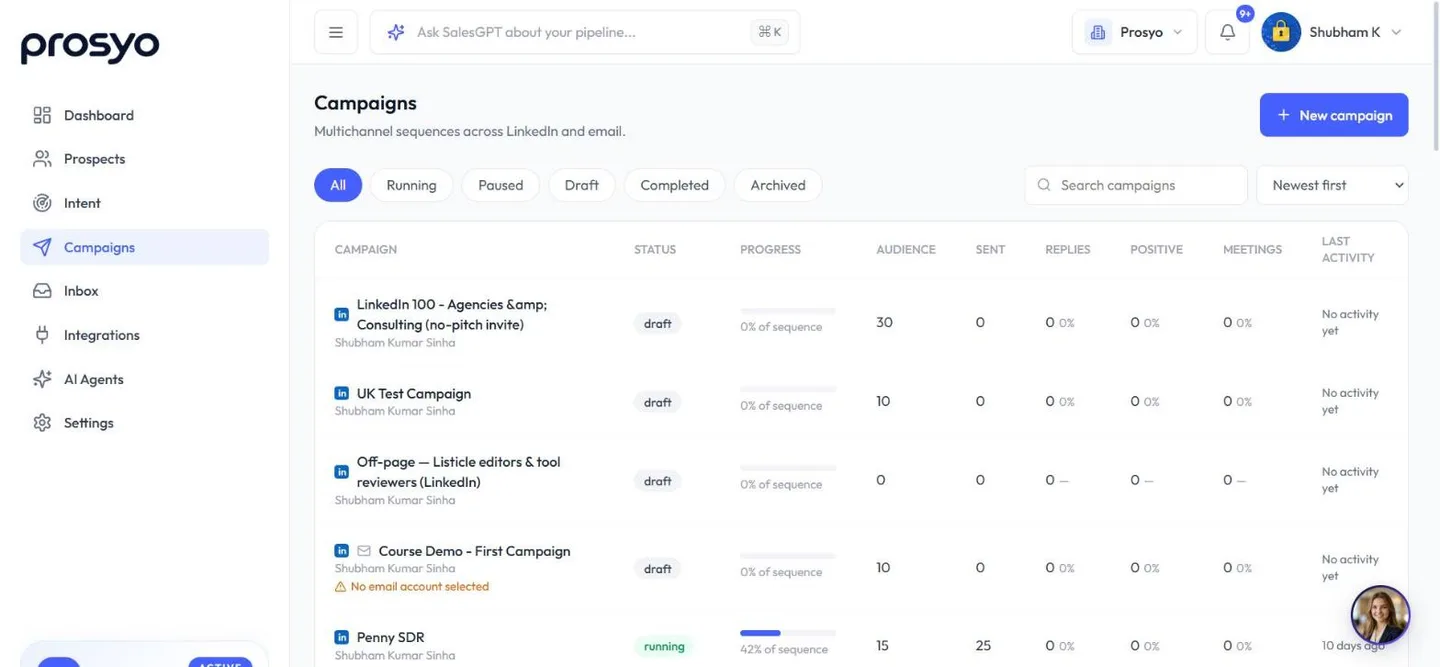
- Go to Campaigns and click New campaign.
- Enter a Campaign name, for example "UK SaaS founders – LinkedIn – Sept".
- Check the Sending timezone. It's detected from your device, and working hours follow it.
- Under How do you want to start?, pick one:
| Option | What you get | Best for |
|---|---|---|
| Start from scratch | Invite, delay, "if they accept", then a LinkedIn message. Edit from there. | You know exactly what you want |
| Use a template | A proven LinkedIn, email or multichannel sequence | Your first campaigns |
| Generate with AI | Describe your goal, and AI drafts the full sequence (1 credit) | Fast first drafts |
| Copy a campaign | Duplicates the sequence of an existing campaign (not its audience or sending settings) | Reusing what works |
| Intent-led | A campaign that fills itself with people who show the buying signals you choose and fit your ideal customer. Each is researched before the first message. | Following up on real interest. See Intent-led campaigns. |
- Click Create & open builder. The campaign opens on the Sequence tab as a draft. Nothing is sent until you launch.
An Intent-led campaign is the exception: Prosyo starts it for you straight away when it can. Nobody is contacted until people match and, with Review first, until you approve them. See Intent-led campaigns.
Templates#
Use a template offers these sequences:
| Template | Steps |
|---|---|
| LinkedIn connect & follow up | Profile visit → connection request → two follow-up messages after they accept |
| Email sequence | Three emails with sensible gaps. Uses your SMTP/IMAP mailbox or Gmail/Outlook. |
| Multichannel: LinkedIn + email | Warm up on LinkedIn, then alternate LinkedIn messages and email |
| Voice note after connecting | Visit → connection request → short message → voice note → follow-up |
| Show the proof (image first) | Connection request → message carrying one image of a result → follow-up |
| Voice note, proof, then email | Connect → voice note → message with an image → email to anyone who didn't reply |
You'll also see five sequences whose names start with Intent:. They're written around research lines for people found by Intent.
You can also start a campaign in one click from Settings → Templates → Library. See One-click campaigns and AI.
Generate with AI#
In What should this campaign achieve?, describe:
- who you're writing to,
- what you offer,
- the outcome you want.
Example:
Book 15-minute intro calls with Heads of Sales at 20–200 person B2B SaaS companies in the UK. We help them book meetings on LinkedIn without hiring more SDRs. Friendly, short, no hype.
AI uses this brief plus your workspace ICP and AI instructions. Always read and edit the draft before you launch.
More example prompts are in One-click campaigns and AI.
After you create it#
Work through the tabs in order:
- Sequence: write your steps.
- Audience: add a list.
- Sending & safety: pick accounts, limits and working hours.
- Launch.
- Reports: watch results.
Active campaign limits#
| Plan | Active campaigns |
|---|---|
| Starter (and the free trial) | 1 |
| Multichannel | 3 |
| Agency / Team | 3 per seat |
| Enterprise | Unlimited |
Penny Agents adds 2 active campaigns to your plan and Penny SDR adds 10. Penny SDR All-in includes 15. On an AppSumo lifetime plan, the number depends on your tier. An agency and its client workspaces share one allowance.
Only running campaigns count. Draft and paused campaigns don't, and neither do the campaigns Intent uses for its own first messages (when you click Send on Intent's Today feed). Resuming a paused campaign counts again. Archive campaigns you've finished.
Want to test several messages or audiences at the same time? Multichannel runs 3 campaigns at once, and Agency / Team runs 3 per seat. See plans.
Find and sort campaigns#
Filter the Campaigns page by status: All, Running, Paused, Draft, Completed or Archived. Use the search box, and sort by Newest first, Last activity, Most replies, Largest audience or Name (A–Z).
A campaign that needs attention shows a short warning under its name. For example, no account is selected, an account needs reconnecting, or "N failed steps in the last 7 days".












