


On this page
Intent finds people who fit your ideal customer and are showing, on their own, that they need what you sell. Someone asking on LinkedIn for a provider like you, messaging you first, sending you a connection request with a note, filling in a form on your site, or announcing funding or a hire that creates the need. You see who they are, what they said, why now, and a first message ready to send. Open Intent from the main menu. No extra data subscription is needed, and you can start without a website.
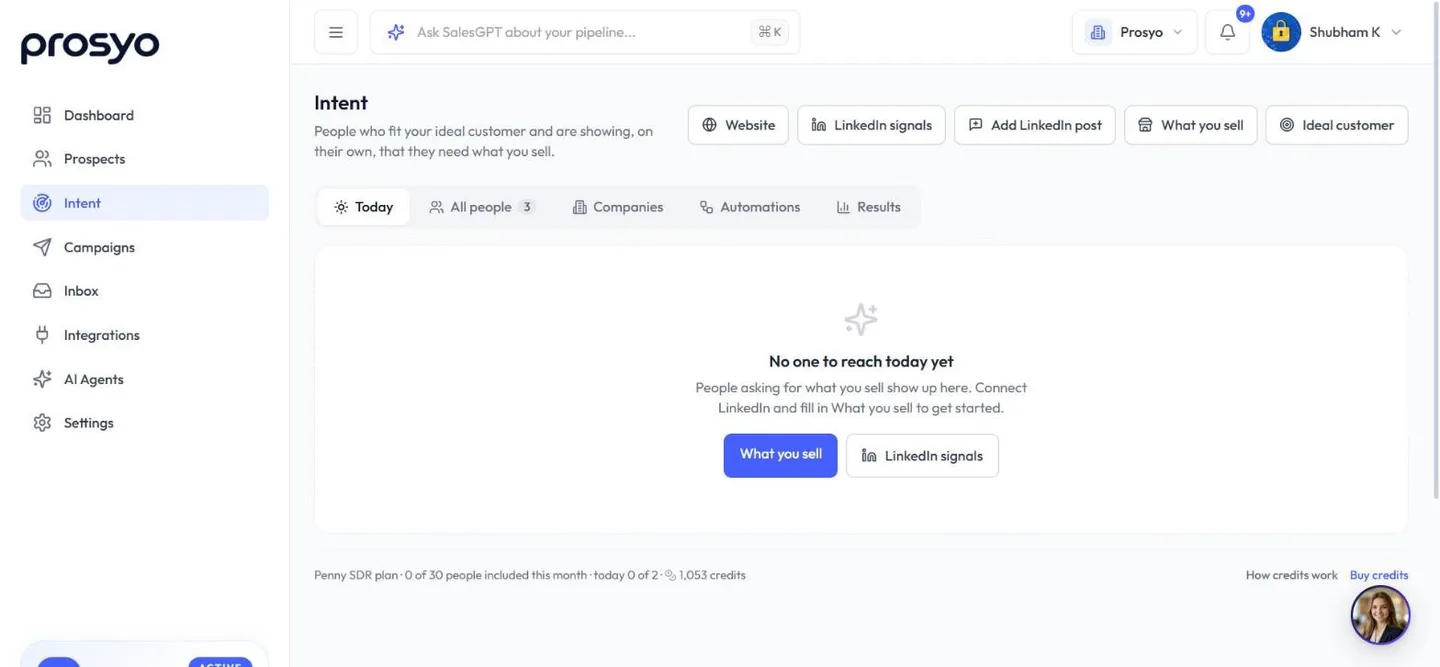
The Intent page has five tabs: Today, All people, Companies, Automations (with Review and Playbooks) and Results. The buttons at the top are Website, LinkedIn signals, Add LinkedIn post, What you sell and Ideal customer.
Replies, email clicks and visits from links you sent are campaign activity, not Intent. They come from your own outreach, so they never use your included people and are never counted as buying signals. You'll find them under Campaign activity on the person, on the prospect's Intent tab and in the campaign.
Today#
Open Today each morning. It lists the people worth reaching now from the last three days (the last week when it's quiet), grouped by what they did:
| Group | What it means |
|---|---|
| Asking | They publicly asked for what you sell. Always first. |
| Evaluating you | They reached out to you, or are looking at you on their own. |
| Moment of need | Something changed that creates the need: funding, hiring for work you do, a launch, expansion or a new decision-maker. |
| Coming back | They returned after a quiet spell, or a past champion moved company. |
Each card shows their words, the offer they matched, why they fit your ideal customer, and a drafted first message. Drafts are free: AI writes up to 40 a day, then a simple template is used, and the card says which. They only mention what the person wrote in public or sent you, never a website visit or a link.
- Edit changes the message. Your version is kept.
- Send puts it in your Intent: first message on LinkedIn campaign (or Intent: first email), which Prosyo creates the first time. It goes out inside your working hours and daily limits, stops if they reply, and doesn't use one of your plan's campaign slots.
- Skip sets the person aside for three days. Not relevant removes them and tells Prosyo which searches don't work for you. The thumbs-up (Good lead) tells Prosyo which searches do work.
- A locked person shows Unlock first. See Your included people and credits.
People you're already talking to, and people already in a running campaign, are left off Today.
What you sell#
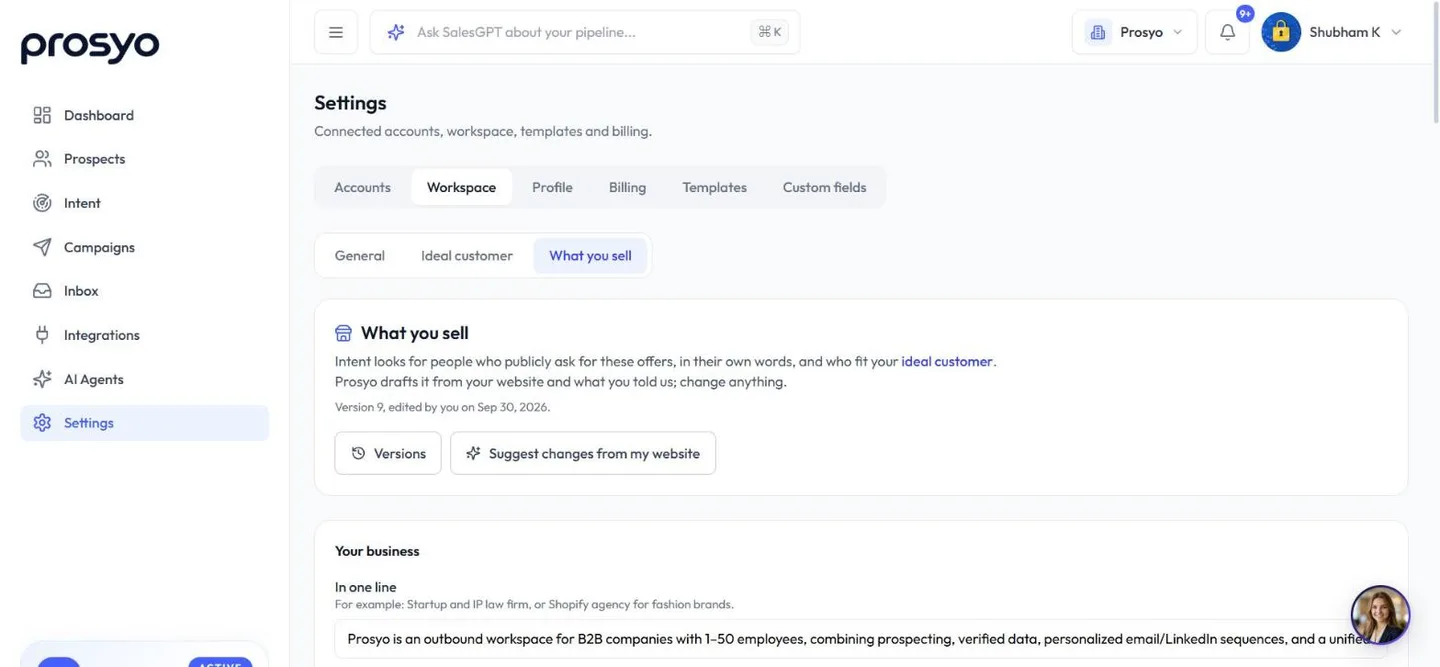
What you sell (also in Settings → Workspace → What you sell) is a short profile of your business that Intent uses to recognise buyers. Prosyo drafts it with AI from your own website (only the pages your site allows robots to read) and your onboarding answers. Change anything:
- Offers (up to five): the problem each one solves, what buyers call it, what they write when they need it (in each language your buyers use), alternatives they mention, and who is never a buyer, for example other agencies like you.
- Moments that create the need: raised money, hiring, a new decision-maker, a launch, expansion, a deadline and more.
- Where to look: LinkedIn post searches for people asking, searches for moments, and competitors.
- Your website pages: which pages are prices, booking or contact, proof, what you offer, careers and sign-in, so visits are read correctly on any kind of site.
- Rules for your messages: review every person before a message is sent, add a label such as "Attorney advertising", and list topics never to act on. Personal-life topics are never used for anyone.
Every save is a new version, and Versions restores an older one. Draft from my website (or, once you have a version, Suggest changes from my website) drafts an update that waits for you to review it. Nothing changes until you save. Owners and admins can edit.
Where the signals come from#
| Source | What Prosyo notices |
|---|---|
| LinkedIn searches | Posts where someone asks for what you sell, found with the searches in What you sell. Each post is checked: it must be a real request from a buyer (not a seller, a recruiter or someone looking for a job) from someone who fits your ideal customer. People who comment on those posts asking for the same thing are found too. |
| Your LinkedIn | People who message you first or send a connection request with a note, people who comment on your posts, on a competitor's or on a topic you name, and customers or engaged contacts who start a new role. Reactions (likes) are shown but never make anyone Warm on their own. Add LinkedIn post brings in the people who commented on or reacted to any post, the same way as importing a post. |
| Your website | Which companies read your prices, booking, proof and offer pages. People are recognised by name when they fill in a form or sign up. When someone opens a link you sent, what they read shows as campaign activity on them, if that campaign has Recognise people who click your links switched on. |
| The Chrome helper | On the LinkedIn profile of someone in Intent, it shows their Intent priority (High-intent ICP, Warm or Warming up, with their intent and fit scores and strongest signal). Click it to open them in Intent. On Who viewed your profile, Send N viewers to Intent adds the named viewers you can see. Private viewers are skipped, and nothing is collected while Intent tracking is paused. |
Prosyo never guesses a person from their internet connection. A company found from a website visit is labelled as the company, not the person who visited.
A name typed into a form or sign-up is taken as the visitor gave it. Anyone can type any email into a form, so these people are marked self-reported, and Autopilot waits for you to check them (see Playbooks).
How people are ranked#
Every person gets two scores from 0 to 100:
- Intent score: how actively they're looking right now. Recent, strong signals count most, and older ones fade. Activity on two channels in the same week earns a bonus.
- Fit score: how closely they match your ideal customer (Settings → Workspace → Ideal customer). Places, job titles and industries are understood in many languages and at any level: "Europe" covers someone in Berlin, and "Geschäftsführer" is read as a C-level role. Open a person to see exactly which parts match and which don't.
People are grouped as High-intent ICP, Warm and Warming up. Someone who asked for what you sell in the last two weeks, or reached out to you directly, and fits your ideal customer is High-intent ICP straight away. Open anyone to see a one-line reason for their level and Why now: each signal with its source, date, their words and a link where there is one. The score helps you set priorities; it isn't a promise that someone will buy.
Intent runs by itself#
Right after onboarding, Prosyo sets Intent up from what you entered. It builds What you sell from your sign-up answer and your website, turns your ICP sentence into ideal-customer rules, adds your website from Settings → Workspace so the code is ready to install, and starts watching your LinkedIn posts, connection requests, job changes and searches once LinkedIn is connected. It only fills in what is empty and never overwrites anything you set yourself. Changing your ICP or website later in Settings → Workspace → General fills in anything still missing the same way; a new website suggests changes to What you sell for you to review.
The Intent runs by itself checklist at the top shows what's ready: What you sell, Ideal customer, LinkedIn signals, Website and Playbook. Hide it once you're done.
You don't have to pick people by hand. Once your ideal customer is saved, Prosyo delivers your plan's included people automatically:
- Best matches first. Only people who fit your ideal customer are delivered from your included amount. By default a person needs a fit of 50 or more. Anything Prosyo doesn't know about someone never counts against them; only clear mismatches do.
- Every day, not all at once. Your included people are spread across the month, so you get fresh suggestions each day instead of using the whole month on the first busy morning. High-intent ICP people always arrive right away. The line at the bottom of Intent shows this month's people used and today's share.
- New today. In All people, choose New today to see just today's suggestions. Warming up shows people who aren't ready yet and why.
- Nothing is lost. People who match but wait for tomorrow's share stay in the list and are delivered in order of fit and interest as your daily share frees up.
Change how people are delivered#
Owners and admins can change this in Settings → Workspace → Ideal customer → Automatic delivery:
- Deliver people with a fit score of at least: Anyone showing interest, 40 · loose match, 50 · good match (recommended), or 70 · strong match only.
- Spread my included people across the month: on by default. Switch it off to deliver everyone as soon as they show interest.
Saving delivers any waiting matches straight away.
Your included people and credits#
Your plan includes a number of Intent people each month.
| Plan | Intent people per month |
|---|---|
| Trial / Starter | 30 |
| Multichannel | 100 |
| Agency / Team | 100 per seat |
| Enterprise | Unlimited |
| Penny SDR All-in | Unlimited |
| AppSumo lifetime deals | 30 (5 codes: 100; 6 codes: 250 per seat) |
The count starts again each calendar month. An agency and its client workspaces share one allowance. While your plan isn't active, Intent tracking is off.
People who show interest but aren't delivered yet, or arrive after your monthly amount is used, appear locked. You can see their role, what they did and what they wrote, with their name, company and contact details hidden, before you spend anything. When you open a locked person, Unlock from my plan uses your included amount first. Unlocking only costs credits once your included people are used up.
| What you get | Credits |
|---|---|
| A person within your plan's monthly amount | Free |
| Unlock an extra person | 10 |
| Research and personalised messages | 10 |
| Extra person plus research | 20 |
Always free: form fills, sign-ups, people who message you first, people still warming up, first-message drafts on Today, reopening research within 30 days, and research that could not be completed (your credits come back automatically).
When your monthly people are used up and you have fewer than 10 credits, tracking pauses on its own, so nothing is collected that you can't use. It starts again when you add credits or at the start of the next month. Buy credits any time in Settings → Billing → Credits. See AI credits.
Research and personalised messages#
Choose Research for 10 credits on a person (in Intent, or on the Intent tab of any prospect). Prosyo reads their LinkedIn profile, recent posts, company page and the signals they gave you, then writes:
- a short summary and the best reasons to reach out,
- an icebreaker, a connection note (under 300 characters), a LinkedIn message, an email subject and an email.
Every sentence is linked to a source you can check. Nothing is invented: numbers, claims and praise that aren't in the sources are left out, and emails end with a simple opt-out line.
Messages never mention that someone visited your website unless you switch on Allow mentioning what they looked at on a campaign's Sending & safety tab. It's off by default. A playbook can also write research lines that mention a visit, with its Allow messages to mention what they looked at on your website option (also off by default). Those lines are only used by campaigns that allow it; other campaigns use the step's fallback instead. Edit any line, and your version is kept even if you research again.
Use the lines in any campaign step with the Research & Intent variables, for example {{research.invite_note}} or {{research.icebreaker|Hi {{first_name}},}} with a fallback. See Variables and personalization.
Save, add to campaigns and act in bulk#
In All people, select people and choose Save to list (their personalised lines go with them), Add to campaign, Unlock, Research, Snooze (for 7 days) or Dismiss. Open a person to mark them Already a customer, which also moves them to the Customer stage in Prospects. Export downloads the list you're looking at.
For a company, Find buyers suggests people in your buyer roles who work there. They're suggestions to research, not the person who visited.
Playbooks#
A playbook does the routine for you: when someone gives a chosen signal and matches your ideal customer, Prosyo researches them and adds them to a campaign. Playbooks live in Automations. Start from a ready-made one:
- People asking for what you sell, Reached out to you on LinkedIn, Looking at your prices or booking, Form fills and sign-ups, Engaged with your posts, Competitor and topic audience and New role, fresh budget.
Each template also creates a campaign whose steps already use the research lines, with sensible fallbacks. Review the messages and connect your sending accounts. The campaign's Intent and research options on its Sending & safety tab, such as Wait for research before sending, start off. Switch on the ones you want.
A campaign's Automatic audience from Intent is a playbook too. It shows in this tab labelled Campaign audience, and shares the same Review queue, limits and budget. See Intent-led campaigns.
Every playbook starts in Review first: matches wait in Automations → Review, you approve with one click, and you see the message before it is sent. Owners and admins can switch a playbook to Autopilot once they trust it.
Autopilot acts on its own only when Prosyo is sure who the person is, for example a LinkedIn post, comment, message or connection request. Form fills and sign-ups typed on your website still wait in Review, because anyone can type any email into a form. If your developers connect your product so it sends sign-ups to Prosyo directly, those are trusted and go straight through.
Each playbook has a daily research limit and a monthly credit budget (300 credits by default), and pauses itself when either runs out. People who asked not to be contacted, customers, people already in a campaign and people you're talking to are always skipped. Outreach starts after the playbook's wait and inside your campaign's working hours.
Results#
The Results tab shows what Intent found, what it cost and what it turned into: signals by what people did (Asking, Evaluating you and so on), people delivered, researched, added to campaigns, contacted, replied, meetings and customers, reply rate compared with your other outreach, credits per meeting, and which signals and playbooks worked best.
Add your website#
- Choose Website, enter your domain and choose Get my code.
- Pick the version that matches your cookie consent tool (Standard, Cookiebot, CookieYes or Google Tag Manager) so tracking starts only after a visitor agrees.
- Paste it on every page. If someone else manages your website, share it with them.
- Check installation shows Working once the first visit arrives.
In Settings for the site you can recognise people who fill in your forms, skip pages such as careers or account pages, choose how long visit history is kept, pause tracking, or create a new site key. Visits from bots, cloud servers and your own team are ignored. Tell Prosyo which of your pages are prices, booking, proof and offers in What you sell so visits are read correctly.
If people sign up for your product, add the Sign-ups snippet so their earlier visits join their name. Details sent from the page are self-reported, so Autopilot waits for you to check these people. At most 60 new people an hour are added from website forms and sign-ups, so a flood of made-up emails can't fill your list.
If the status doesn't change, check that the saved domain matches your published website and that the code is on the page you opened. Your website's consent settings or browser privacy tools may also stop a visit from being recorded. See Troubleshooting.
LinkedIn signals#
Choose LinkedIn signals to see and change what Prosyo watches: the searches for people asking for what you sell (with how many posts each read and how many people it found), your posts, connection requests, a competitor or influencer (comments only), topic commenters, and job changes. Edit the searches in What you sell.
- LinkedIn accounts connected by an owner or admin are watched automatically. Teammates switch on their own account here, and can only change watching for accounts they connected.
- Watching and research read profiles and searches in the background. They don't use your campaign's daily invites, messages or visits, so outreach and Intent never compete.
- Connection requests and profile views on a teammate's account stay visible to that teammate (and to owners and admins).












