


On this page
Where to look#
| Place | Shows |
|---|---|
| Dashboard | Meetings booked, reply rates, outreach activity for the last 30 days, your pipeline, active campaigns and conversations to work |
| Campaigns list | Status, progress, audience, sent, replies, positive replies, meetings and last activity for each campaign, plus a warning when something needs attention |
| Campaign → Reports | Full detail for one campaign |
| Inbox | The actual replies |
| Notification bell | New replies, account problems and campaigns that were paused |
On the Campaigns list, a warning under a campaign's name tells you when no account is selected, an account needs attention, or there were "N failed steps in the last 7 days".
The Reports tab#
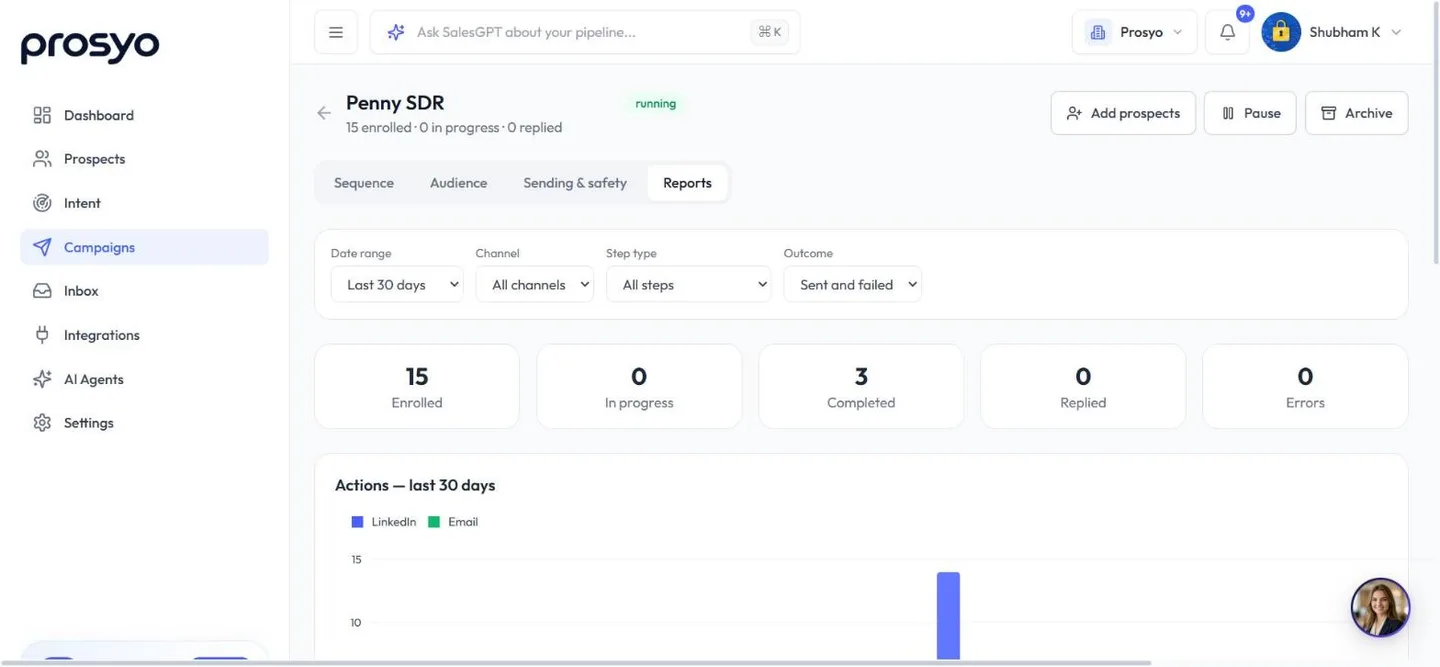
Filters#
- Date range: Last 7, 14, 30 or 90 days, or a custom range
- Channel: All channels, LinkedIn or Email
- Step type: All steps, or one type of step
- Outcome: Sent and failed, Sent only, or Failed only
Reset filters goes back to the last 30 days, all channels, all steps, and sent and failed.
What you see#
- Enrolled, In progress, Completed, Replied and Errors. Errors counts people whose sequence stopped because of an error.
- Actions, a chart of actions per day, split into LinkedIn and Email
- Conversion cards:
- Accepted invitations and the Acceptance rate: accepted ÷ invitations sent
- Answered messages and the Response rate: people who replied ÷ messages sent (LinkedIn messages, InMails and emails)
- Positive replies and the Positive rate: people at the Interested, Meeting or Customer stage ÷ people who replied
- Video, if the campaign has a personalized video step: sent, played, watched half, clicked and credits used, and, with Send to half, replies with and without the video
- Per-step performance: sent and failed for each step and channel
- Why steps failed or were skipped: each reason in plain words with a count and when it last happened, for the same period and channel. A reason marked about the sending account, not one prospect means the account needs attention, not the person. A skipped step moves the person on; a failed step isn't retried for that person.
If a person's step can't be completed because of an error, Prosyo tries again a few times. If it still can't, it stops that person and counts them under Errors. Everyone else carries on sending.
Every number comes from real sends and replies. There's no sample or demo data.
Campaign progress#
Progress on the Campaigns list is steps sent ÷ (people in the campaign × sending steps in the sequence). A reply that stops someone's remaining steps doesn't jump the bar to 100%.
Benchmarks#
Use these as rough guides, not promises:
| Metric | Needs work | Healthy | Great |
|---|---|---|---|
| Invite acceptance | Under 20% | 25–40% | Over 40% |
| LinkedIn reply rate | Under 5% | 8–15% | Over 20% |
| Email reply rate | Under 1% | 2–5% | Over 8% |
What to change when#
| You see | Try |
|---|---|
| Low acceptance | Tighter targeting (2nd-degree, active on LinkedIn), a shorter note or no note, add a profile visit first |
| Accepts but no replies | Rewrite the first message: shorter, one question, no pitch |
| Replies but no meetings | Make the ask easier: a specific time or a calendar link |
| Many failed steps | Read Why steps failed or were skipped on the Reports tab, then check Settings → Accounts and your daily limits |
| Nothing sending | Check working hours, the timezone, daily caps and account health |
Monitor from outside Prosyo#
- Get replies in Slack.
- Send events to n8n, Zapier or Make for dashboards.
- For help interpreting a week or month, filter Reports first, then share the figures and dates with SalesGPT. Ask: "Compare these reply rates and suggest what to improve."
- If your workspace has AI Agents, ask Agent Penny "How are my campaigns doing?".












