B2B Prospecting
September 23, 2026
36 min read




LinkedIn outreach works best when the prospect feels there was a real reason to contact them. That means a tight audience, a short message, genuine context and a next step that does not demand too much too soon. The templates below are designed for that style of B2B prospecting: conversational, low-hype and easy to answer.
Prosyo combines LinkedIn outreach with prospecting, AI personalization, email, sequences and replies so the templates can become part of one campaign rather than isolated DMs.
| Build LinkedIn outreach in Prosyo Start free → Import the right prospects, personalize the message, set human-paced limits and coordinate LinkedIn with email when the campaign calls for it. |
Useful reading: LinkedIn outreach automation, LinkedIn outreach software, best LinkedIn outreach tools, and LinkedIn limits explained.
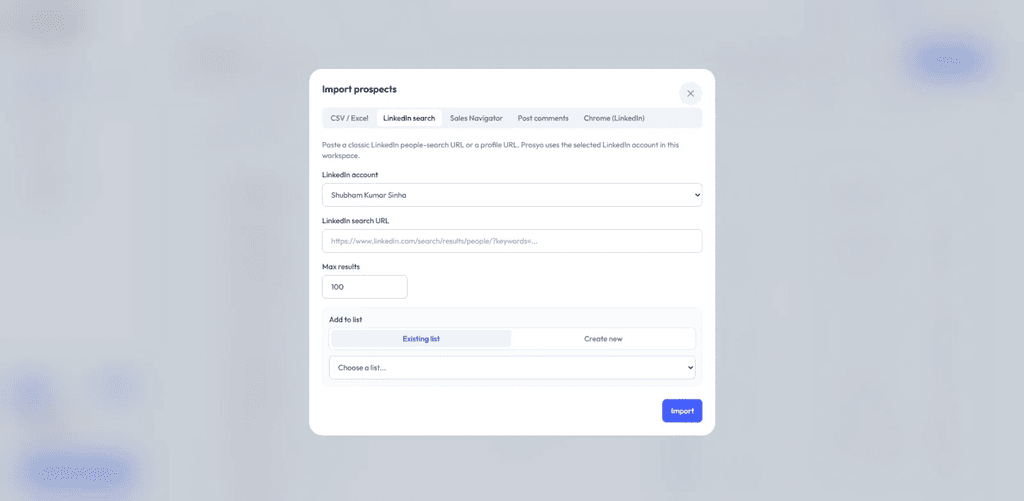
Prosyo LinkedIn import: bring a targeted LinkedIn or Sales Navigator search into a prospect list before messaging.
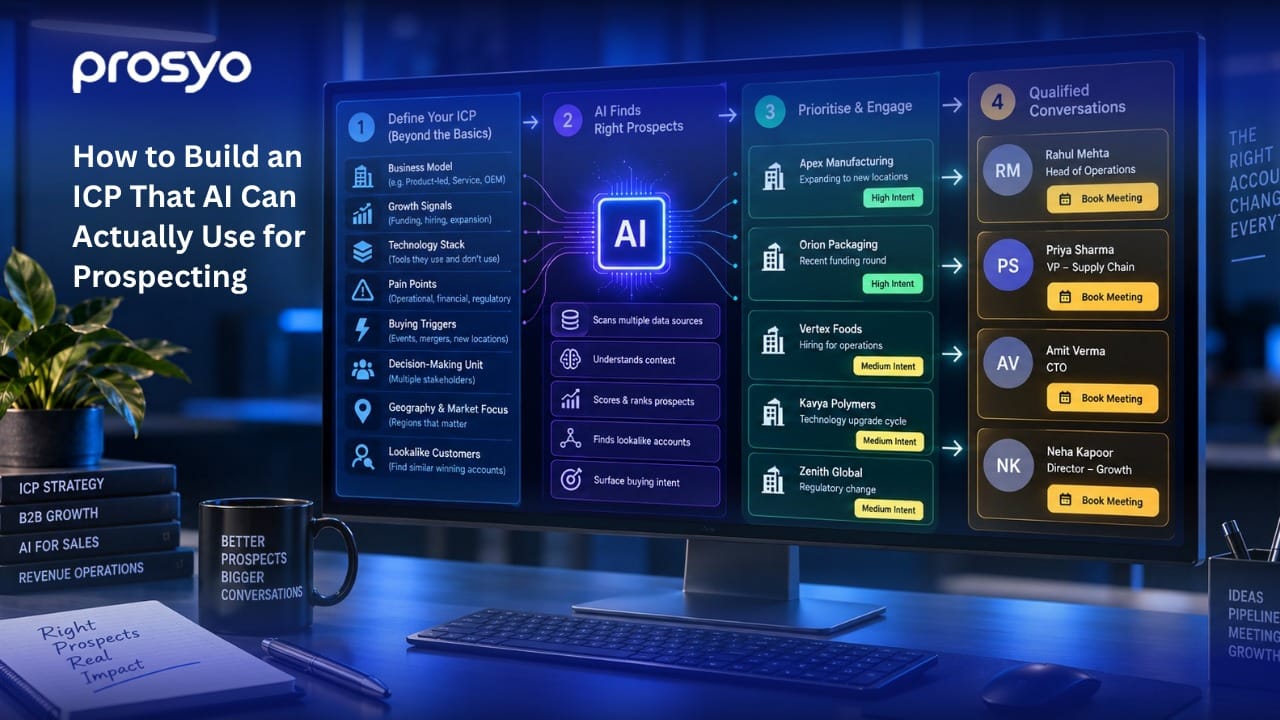
A short LinkedIn message can still fail if the list is broad. Define the ICP first, then choose the search filters, accounts, roles and signals that create a defensible reason for contact. If you are using Sales Navigator, narrower filters around seniority, headcount, job changes or recent activity can help create more specific campaigns.
See how to build an ICP AI can actually use, Prosyo Prospecting, import from LinkedIn and define your ICP.
Best for: Use when there is no strong trigger
| Hi {{first_name|there}}, would be good to connect. |
Best for: Use for peers in the same market
| Hi {{first_name|there}}, I spend a lot of time with {{title|leaders}} in your space and like staying connected with people doing thoughtful work at {{company_name|companies like yours}}. |
Best for: Use after liking or commenting
| Hi {{first_name|there}}, your recent post caught my attention. Would be great to connect. |
Best for: Use after a role change
| Congrats on the new role at {{company_name|the new company}}, {{first_name|there}}. Would be great to connect. |
Best for: Use after a shared event/community
| Hi {{first_name|there}}, noticed we are both around the same B2B sales conversations. Always useful to connect with people working on similar problems. |
Best for: Use when you want the lowest-friction invite
| Hi {{first_name|there}}, came across your profile while researching {{title|sales leaders}}. No pitch in the invite — just thought it made sense to connect. |
Best for: Use one day after acceptance
| Thanks for connecting, {{first_name|there}}. Curious how {{company_name|your team}} handles outbound today — mostly founder-led, SDR-led, agency, or a mix? |
Best for: Use when selling sales technology
| Thanks for connecting. Is your prospecting, LinkedIn, email and reply handling in one workflow today, or spread across a few tools? |
Best for: Use when targeting GTM leaders
| Thanks for connecting, {{first_name|there}}. How tightly defined is the ICP at {{company_name|your team}} right now — specific accounts and roles, or still fairly broad? |
Best for: Use when you have a first-touch line
| Thanks for connecting, {{first_name|there}}. {{personalized_message|I came across your work and thought it was relevant.}} Is that area a real priority this quarter? |
Best for: Use for founders
| Thanks for connecting. Founder-led outbound can work incredibly well but becomes hard to sustain manually. Are you still personally involved in prospecting at {{company_name|your team}}? |
Best for: Use for agencies/consultants
| Thanks for connecting, {{first_name|there}}. Does {{company_name|your team}} run a consistent outbound motion for new business, or is growth still mostly referrals and inbound? |
Best for: Use to start a diagnostic conversation
| Quick question: what is the biggest outbound bottleneck at {{company_name|your team}} right now — targeting, personalization, follow-up, or turning replies into meetings? |
Best for: Use for teams scaling activity
| Are you trying to increase outbound volume this quarter, or improve the quality of the same volume? I ask because the workflow looks very different depending on the goal. |
Best for: Use for multichannel buyers
| Do LinkedIn and email work as one sequence for your team today, or are they still run as separate campaigns? |
Best for: Use for sales teams
| How quickly does someone at {{company_name|your team}} usually respond when a prospect replies positively? We see a surprising amount of pipeline lost between reply and follow-up. |
Best for: Use when discussing warmer targeting
| Does your team prioritize accounts showing stronger intent, or is outbound mostly list-driven today? |
Best for: Use for AI-forward prospects
| Is your team already using ChatGPT or Claude in sales work? Curious whether you use AI only for copy, or also for campaign research and workflow decisions. |
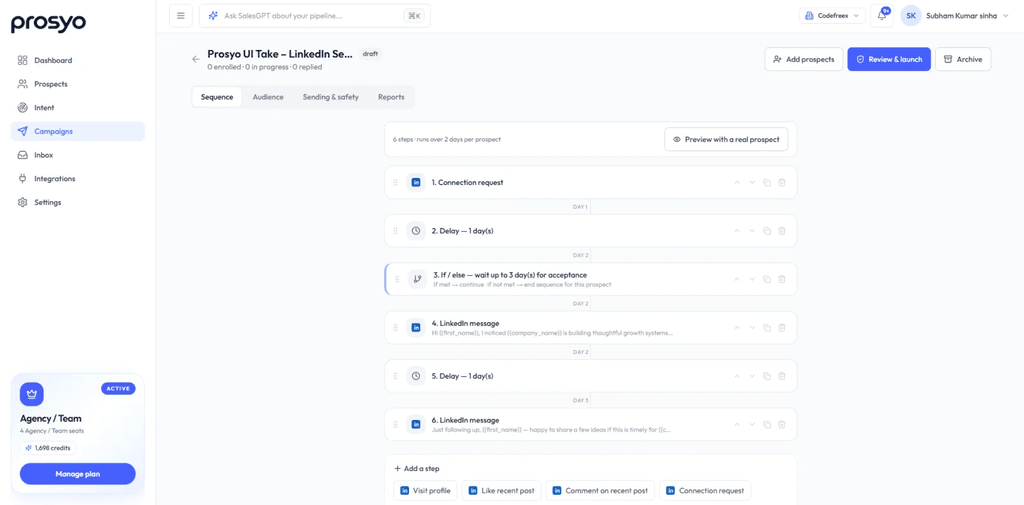
Prosyo sequence builder: combine profile activity, connection requests, LinkedIn messages, delays, conditions and email touches in one campaign.
Best for: Use after a new role
| Congrats again on the move, {{first_name|there}}. New roles usually come with a short list of systems and pipeline problems to fix. Is outbound one of them? |
Best for: Use when the company is hiring sales roles
| Noticed {{company_name|your team}} is growing the sales org. Are you also tightening the prospecting and follow-up process, or mainly focused on headcount first? |
Best for: Use after funding or expansion
| Saw the recent growth at {{company_name|your team}}. When outbound volume increases, the process often fragments fast. Are you already standardizing how LinkedIn and email work together? |
Best for: Use when entering a market
| Looks like {{company_name|your team}} is expanding into new markets. Are you building the outbound list internally, or using partners/data tools to define the first account set? |
Best for: Use after a product launch
| Congrats on the launch. Are you planning a targeted outbound motion around the new offer, or keeping the launch mostly inbound? |
Best for: Use after relevant content
| {{personalized_message|Your recent post was useful.}} It made me curious how {{company_name|your team}} is approaching this in practice, especially on outbound. |
Best for: Use after a like
| Your post on sales process was a good read, {{first_name|there}}. The point about consistency especially resonated. How are you handling follow-up at {{company_name|your team}} today? |
Best for: Use after you commented
| Good discussion on your post. Rather than turn the comments into a pitch, I was genuinely curious: is outbound a meaningful growth channel for {{company_name|your team}} right now? |
Best for: Use when they liked/commented on you
| Thanks for engaging with my post, {{first_name|there}}. Since the topic was outbound, curious whether you are actively building that motion at {{company_name|your team}} or just exploring ideas. |
Best for: Use for event-related engagement
| Saw your event post. There is usually a good follow-up window after events while the context is fresh. Are you doing anything structured with attendees or engaged accounts afterward? |
Best for: Use for senior prospects
| I like how you talk about the problem without turning every post into a product pitch. That is also how we think about outbound: context first, ask second. How does your team approach it? |
Best for: Use when they repeatedly engage
| You have popped up around a few of our outbound posts, so I figured I would ask directly: is this something {{company_name|your team}} is working on, or are you just keeping an eye on the space? |
Best for: Use for founders
| Founder question: if you could remove one repetitive part of outbound without losing control of the message, what would it be? |
Best for: Use for sales leaders
| For sales leaders, the hardest part is often consistency across reps. Do your sequences and follow-up rules look mostly standardized at {{company_name|your team}}, or rep-by-rep? |
Best for: Use for RevOps
| RevOps question: can you currently see LinkedIn activity, email touches, replies and stage movement in one outbound view, or does reporting still require stitching systems together? |
Best for: Use for agency founders
| Agency question: is new-business outbound something your team runs continuously, or does it tend to restart whenever referrals slow down? |
Best for: Use for consultants/coaches
| For a high-value consulting offer, would you rather reach 100 very relevant accounts with context or 5,000 broadly matched leads? We built our workflow around the first approach. |
Best for: Use for local business/service sellers
| If your market is location-based, LinkedIn can be surprisingly precise for finding owners and decision-makers. Are you using it systematically or mostly through referrals today? |
Best for: Use 3–4 days later
| {{first_name|Hi}}, circling back with one question rather than another pitch: is outbound a current priority at {{company_name|your team}}, or should I leave this for later? |
Best for: Use when first message was ignored
| Different angle from my last note: most teams do not need more messages; they need better-fit accounts and more relevant follow-up. Is list quality or message quality the bigger issue for you? |
Best for: Use with a resource
| Thought this might be useful: we have a practical guide on building an ICP that AI can actually use for prospecting. Happy to send it if that is relevant. |
Best for: Use before the final message
| I do not want to clutter your LinkedIn inbox. Is this a ‘not now’ or a ‘not relevant’ for {{company_name|your team}}? Either is completely fine. |
Best for: Use instead of asking for a meeting
| Rather than ask for a call, I can send the 2-minute overview of how Prosyo connects prospecting, personalization, LinkedIn, email and replies. Want it? |
Best for: Use if you may have the wrong person
| I may simply have the wrong person. Who owns outbound or sales development at {{company_name|your team}}? Happy to speak with them instead. |
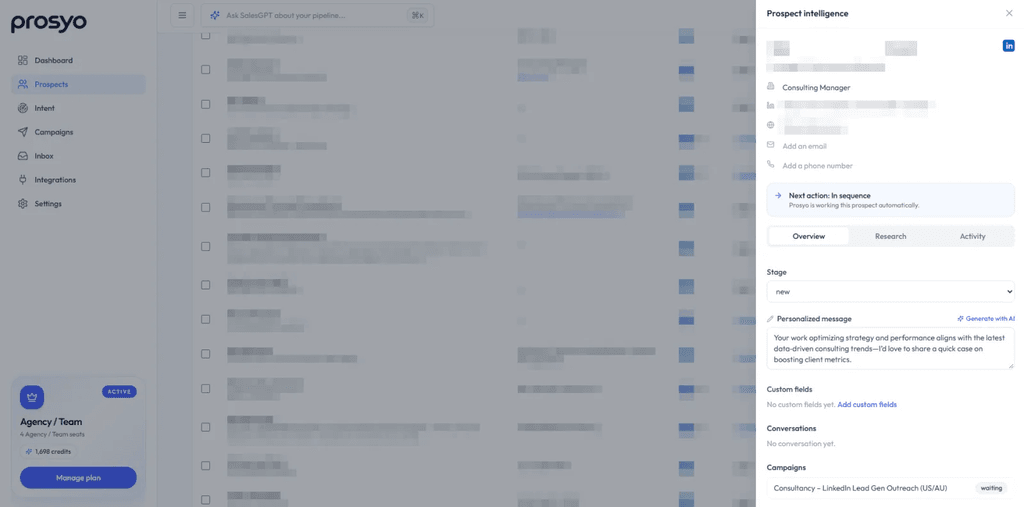
Prosyo prospect panel: keep prospect context available while personalizing outreach and deciding the next action.
Best for: Use without a case-study claim
| One pattern we keep seeing: teams improve results faster by tightening ICP + follow-up logic than by increasing daily volume. Is that something you have tested at {{company_name|your team}}? |
Best for: Use when email is part of the stack
| If email is part of your outbound motion, the safest approach is usually low per-mailbox volume, clean lists and proper SPF/DKIM/DMARC before worrying about clever copy. Happy to send our checklist. |
Best for: Use for AI messaging buyers
| AI personalization works best when it uses real prospect/company context and the campaign reason — not just a scraped fact in sentence one. Are you already doing that at {{company_name|your team}}? |
Best for: Use for LinkedIn + email
| The best multichannel sequences do not copy the same pitch into LinkedIn and email. Each channel should add context. Want a simple sequence example? |
Best for: Use for sales leaders
| A positive reply is still just the start. We have been focusing a lot on response speed, qualification and moving the right threads into pipeline. Is that workflow clean on your side? |
Best for: Use when execution capacity is low
| If the issue is not tooling but bandwidth, we also run managed ABM + AI SDR campaigns — account research through reply qualification. Would execution support be more useful than software alone? |
Best for: Use before moving to email
| If it is easier, I can send the details by email instead of writing a long LinkedIn message. Which do you prefer? |
Best for: Use after an email touch
| I sent a short email with the detail so I would not cram it into LinkedIn. No need to reply in both places — whichever channel is easier works. |
Best for: Use when both channels are active
| You may also see an email from me. It is not a second pitch; I kept the detail there and left LinkedIn for the shorter conversation. |
Best for: Use after interest
| Happy to keep this here, or if it is easier to talk live, my calendar is {{calendar_link}}. No pressure either way. |
Best for: Use to share a longer resource
| This is easier to show than explain in a DM. I can send the full sequence example by email if you want it. |
Best for: Use when they want done-for-you
| If you are looking for execution rather than another platform, I can send the managed ABM + AI SDR overview by email. That is a different service from the software itself. |
Best for: Use as the final touch
| Last note from me, {{first_name|there}}. I will close the loop so I do not keep adding noise. If outbound becomes a priority later, happy to reconnect. |
Best for: Use when timing is unclear
| I will assume this is not a priority for {{company_name|your team}} right now and stop here. If that changes, you know where to find me. |
Best for: Use to get a clean answer
| Quick final check: 1) relevant later, 2) send the overview, or 3) not a fit. A number is enough and I will follow your lead. |
Best for: Use after a real pause
| Hi {{first_name|there}}, we spoke a while back when the timing was not right. Has outbound moved higher on the list at {{company_name|your team}}, or should I keep this closed? |
Best for: Use when there is a real product update
| One reason I am reopening this: Prosyo can now be operated through ChatGPT and Claude with MCP for research, campaign work and reply workflows. If your team is AI-heavy now, it may be more relevant than before. |
Best for: Use when software was not the fit
| Last time software may not have been the answer. We also offer managed ABM + AI SDR execution now. If bandwidth was the blocker, that could be the more relevant conversation. |
The same prospect can receive very different messages depending on what has already happened. A connection request should create recognition, not demand a meeting. A first message after acceptance should open a conversation. A follow-up should add a reason to respond. A re-engagement message should acknowledge the gap instead of pretending the previous thread never existed. Choosing the template by stage is more important than choosing the cleverest wording.
For a completely cold prospect, use the simplest version that still explains why the connection makes sense. If you have a genuine trigger — a role change, hiring signal, recent post, market expansion or event — use it, but connect it to the business reason for outreach. Avoid turning a public fact into an exaggerated claim about what the prospect must be thinking or struggling with.
After acceptance, do not immediately dump the entire value proposition. Start with a question that helps you understand how the prospect currently handles the problem. That creates two advantages: the message is easier to answer, and the reply gives you context for the next step. A sales conversation becomes more credible when the second message is shaped by the first reply rather than by a prewritten pitch sequence.
When the prospect has already engaged with your content, commented on a post or attended an event, the outreach can be warmer because there is shared context. The message should still respect the difference between engagement and buying intent. Someone liking a post is not permission to claim they are evaluating software. Use the engagement as the reason to start a conversation, then qualify interest through the conversation itself.
For senior decision-makers, shorter is usually safer. Executives can understand a clear business problem quickly; they do not need a long explanation of every feature. For operational buyers such as RevOps or sales operations, a specific workflow question can be stronger because they often care about how systems, data and handoffs actually work. Match the message to what the role is likely responsible for, not merely the title in the profile.
Pitching inside the invite: A connection request is a poor place for a full offer, meeting ask and product explanation. Keep the invite focused on the connection unless the context genuinely demands more.
Using fake personalization: Generic praise about a website, career or recent post is easy to detect. If the observation does not change why you are contacting the person, it is decoration rather than personalization.
Sending the same message to every role: A founder, Head of Sales and RevOps leader may care about the same outbound system for different reasons. Change the question and business angle accordingly.
Repeating the first message in follow-ups: “Just following up” gives the prospect no new reason to answer. Add a useful resource, a different question, a clearer angle or an easy out.
Treating activity as intent: A profile view, post like or connection acceptance is context, not proof of buying intent. Keep claims proportional to what you actually know.
Optimizing for maximum daily actions: More invitations do not fix weak targeting. A smaller list with stronger fit and better acceptance quality is a healthier foundation for scaling.
Continuing automation after a reply: Once the prospect responds, the sequence should stop and the conversation should become human-led. The reply itself is the signal to change modes.
Do not judge a message only by the number of sends. Look at the quality of the funnel around it: connection acceptance, actual replies, positive or question-based replies, meetings created, and whether the conversation fits the ICP you intended to reach. A high acceptance rate with no meaningful conversations can still mean the targeting or first message is too broad.
Test one meaningful variable at a time. For example, compare a short no-pitch invite against a shared-context invite for the same audience, or compare a question-led first message against a value-led first message. If you change the audience, offer, message and timing simultaneously, you will not know what caused the difference.
The most useful learning loop connects message performance back to the prospect segment. A template that works with founders at 10–50 person SaaS companies may perform very differently with enterprise RevOps leaders. Keep the copy attached to the ICP and campaign reason rather than building a universal “winning message” library that ignores context.
Use Prosyo Analytics and campaign reports to review campaign activity alongside replies and prospect progress, then use A/B testing when you have enough volume for a useful comparison.
Good personalization explains relevance. It does not prove how much data you collected. Mention a real trigger, role, company context or business problem only when it naturally connects to the reason you are reaching out.
A useful AI-generated first line should sound like something a thoughtful salesperson would notice, not a surveillance report. Avoid forced compliments, irrelevant personal facts and claims you cannot verify.
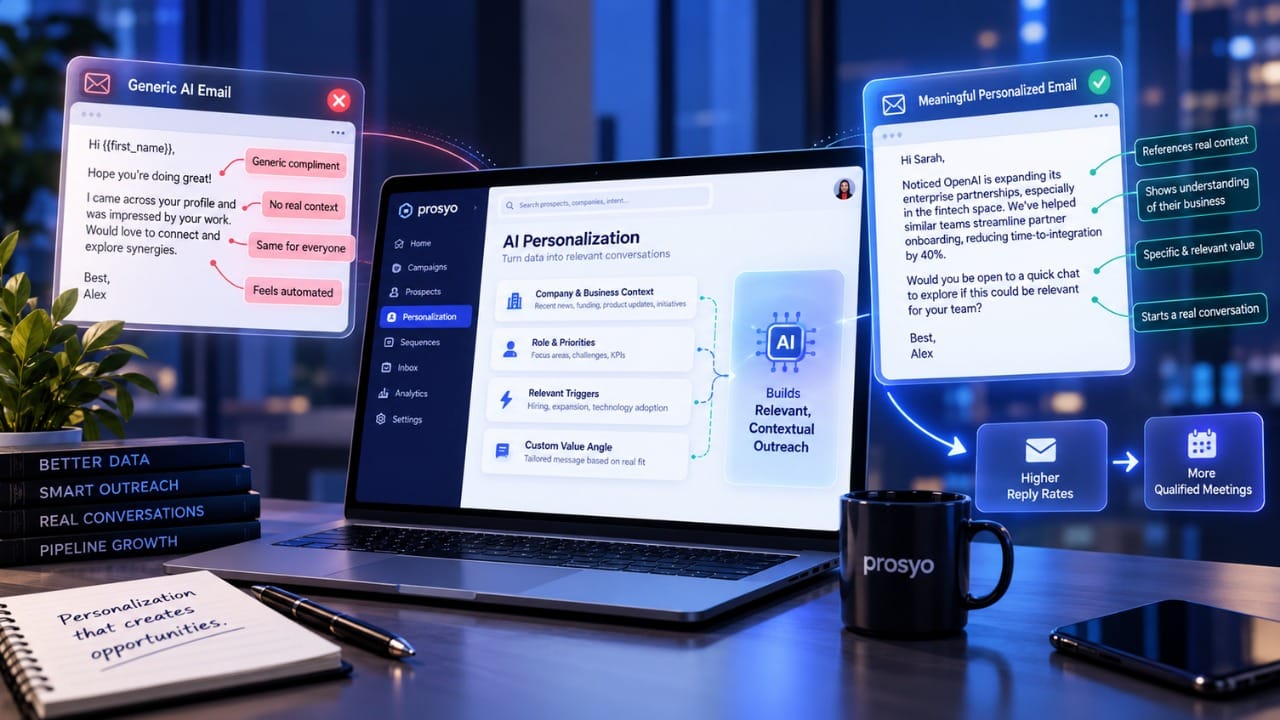
Prosyo can use prospect and company context to prepare first-touch lines, message variations and campaign copy. The important control is review: read what the AI produced, preview real prospects and change anything that sounds generic or overconfident.
Explore AI Personalization, AI Icebreakers and variables and personalization.
| Timing | Action |
| Day 1 | Visit the profile. If there is a genuinely relevant recent post, engage naturally. |
| Day 2 | Send a short connection request. Do not lead with the product pitch. |
| After acceptance | Wait long enough for the connection to feel natural, then send one question-led message. |
| 3–4 days later | Follow up with a different angle or something useful rather than repeating the first ask. |
| Later touch | If email is available and appropriate, use it for additional context instead of duplicating the LinkedIn message. |
| Final touch | Close the loop respectfully. Make it easy to say “later” or “not relevant.” |
Prosyo supports these step types in its sequence builder, and provides a LinkedIn-first ABM playbook plus a post-engagement playbook.
LinkedIn limits vary by account age, history, acceptance behavior and other signals, and the platform does not publish one universal safe number. A conservative operating model is more defensible than trying to discover the maximum. Keep action pacing human, work inside normal hours, withdraw stale invitations when appropriate and watch acceptance quality.
Prosyo includes daily limits, random delays between actions, working hours, auto-withdraw options, stop-on-reply behavior and pausing when an account disconnects. Those controls reduce bursts, but targeting quality and responsible behavior still matter.
Read sending limits and safety, LinkedIn limits explained, and responsible outreach.
LinkedIn is strong for short conversational touches and social context; email gives you more space when the prospect needs detail. The cleanest multichannel sequence shares the same prospect and campaign context but adapts the message to the channel. Do not make the recipient process the same pitch twice.
See Prosyo Email Outreach, Multichannel Outreach and the multichannel playbook.
The automation has done its job once the prospect replies. Stop the remaining sequence, read the full thread, answer the actual question and decide whether the conversation belongs in Interested, Meeting, Follow-up or Do Not Contact. Fast, contextual response is more important than squeezing out another automated touch.
Prosyo’s Unified Inbox brings LinkedIn and email conversations together. The docs also cover the unified inbox workflow and reply templates.
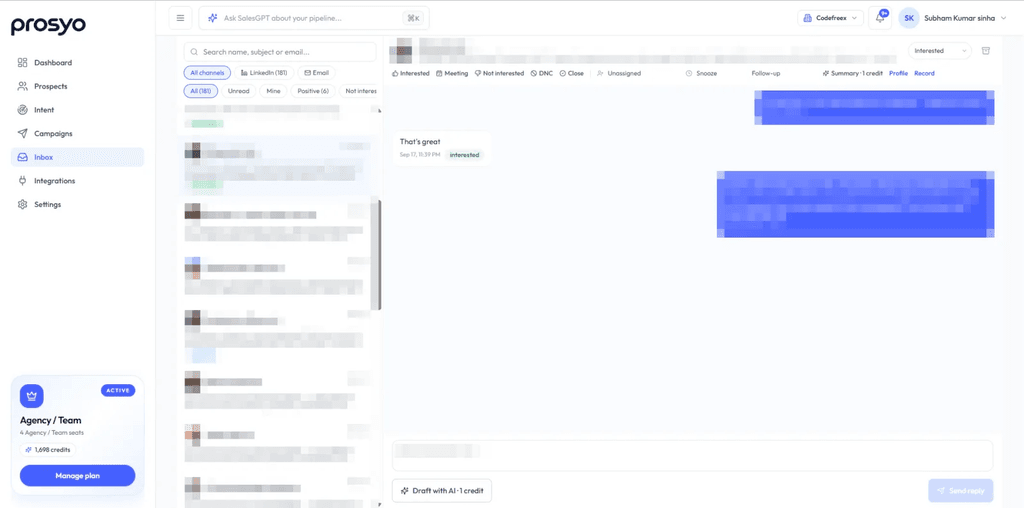
Prosyo Unified Inbox: manage LinkedIn and email conversations together after a prospect replies.
Prosyo is designed to connect the full outbound motion: import prospects from LinkedIn or Sales Navigator, enrich context, prepare AI-assisted personalized copy, build LinkedIn + email sequences, apply sending controls, stop on reply, manage conversations centrally and track prospect progress. For AI-first workflows, supported tasks can also be operated through ChatGPT and Claude with MCP while important sending actions remain reviewable.
Explore LinkedIn Outreach, Sequences, Prospecting, Unified Inbox and Prosyo pricing.
| Want Prosyo to run the outbound motion for you? Managed ABM + AI SDR → Prosyo can also operate target-account strategy, research, personalized LinkedIn + email outreach, reply handling, qualification and sales handoff as a managed service. |
No. A short plain request can be better when there is no strong context. Use a note when it gives the recipient a real reason to recognize the connection, not because every invite must contain a mini-pitch.
Short enough to read in one glance. Prosyo’s template guidance favors concise LinkedIn messages with one ask. If you need more explanation, move the detail to email or a resource.
There is no universal number. Send a small sequence where each message adds a new angle, then close the loop. Stop immediately if the prospect asks you to stop or replies in a way that requires human handling.
Automation does not remove platform risk. Use conservative limits, natural delays, good targeting, normal activity patterns and human review. LinkedIn limits can vary, so avoid treating any published number as a guaranteed safe threshold.
It can improve targeting because it offers additional search and account filters. Better targeting makes message relevance easier and often matters more than adding another follow-up.
Yes, but ground it in the ICP, campaign goal and verified prospect/company context. Review the output and avoid invented facts, exaggerated familiarity or messages that sound machine-generated.
Use email when you need more room for context, when the prospect has not accepted after a reasonable window, or when the campaign design intentionally coordinates both channels. Keep the story coherent across channels.
The default workflow stops remaining campaign steps, moves the prospect into a reply stage and surfaces the conversation in the Unified Inbox so the next action can be handled manually.
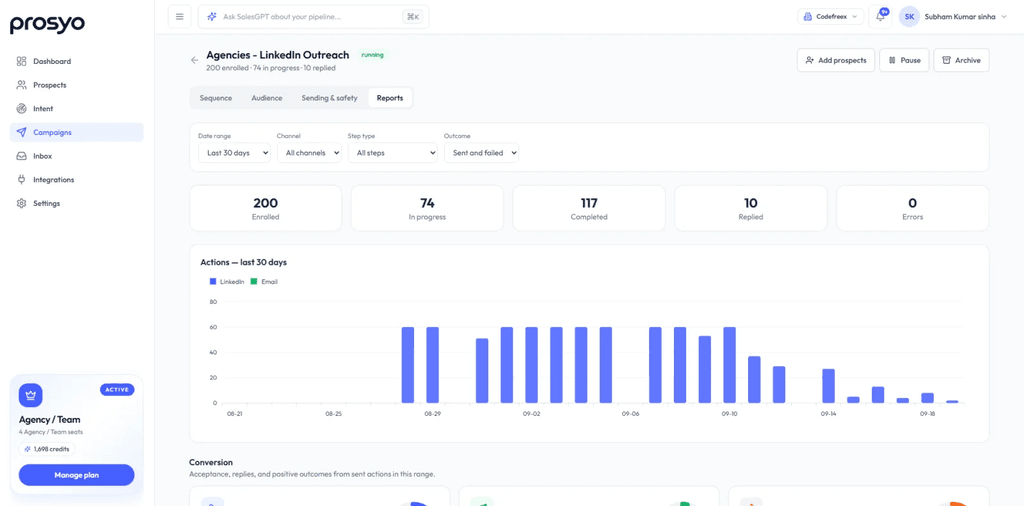
Prosyo campaign reporting: review activity, replies and prospect progress to improve targeting and sequence quality.
| Build the sequence, not just the message Start free with Prosyo → Or contact Prosyo for managed outbound and sales questions. |