AI Sales
October 24, 2026
24 min read



Last reviewed: October 24, 2026 · Practical tutorial · Estimated reading time: 20 minutes
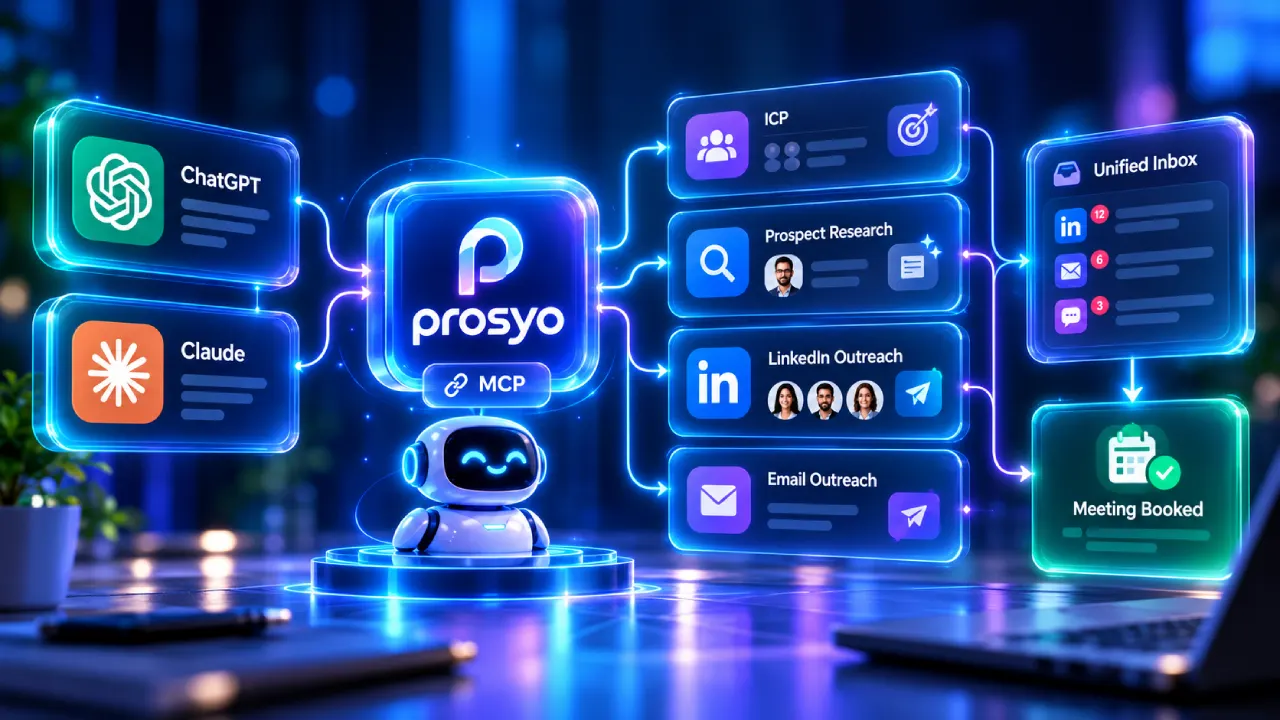
Can ChatGPT or Claude run LinkedIn outreach? Yes, when a compatible sales platform exposes the right data and actions through an authorized app or Model Context Protocol (MCP) connector. For founders and sales teams that want to manage campaigns conversationally rather than juggle spreadsheets, Prosyo connects campaign research, prospect context, draft creation, inbox review and selected, confirmation-gated actions to supported ChatGPT and Claude environments. The connection does not grant unlimited access to LinkedIn, and it does not make prohibited scraping or website automation permissible.
This is a practical, 2026 ChatGPT and Claude LinkedIn outreach setup guide for people who want useful workflows rather than generic “AI will book 100 meetings overnight” promises. You will learn how the technology works, how to connect Prosyo, what prompts to run, how to build a campaign from an ideal customer profile (ICP), how to add email, how to evaluate replies, and when human approval is essential. We also explain the trade-offs between MCP, APIs, automation platforms and autonomous AI SDRs.
The opportunity: the advantage of an AI-connected outbound stack is not a higher send count. It is that buyer research, message drafting, campaign oversight, replies and pipeline can share a common context instead of living in disconnected applications.
For a small B2B team seeking one workflow for LinkedIn, email, prospect research and campaign management, Prosyo is a compelling starting point because it offers documented ChatGPT and Claude MCP connections alongside a unified outbound workspace. Connect a supported AI client to Prosyo, verify the authorized workspace, ask for a read-only campaign summary, then create a draft from a narrow ICP. Review the audience and messages before approving any sending action. Do not assume every AI client plan supports custom connectors or write actions.
| Approach | Ideal user | Typical work | Key limitation |
|---|---|---|---|
| Prosyo + ChatGPT/Claude via MCP | Founders, agencies, B2B outbound teams | Read campaign context, build drafts, inspect inbox, manage permitted actions | Client permissions, plan limits and human review still apply |
| Standalone ChatGPT or Claude | Research and copywriting users | Develop positioning, edit messages, analyze provided notes | No live Prosyo or LinkedIn account context unless connected |
| CRM + API integration | Engineering teams | Custom, deterministic workflows | Development and maintenance cost |
| Generic automation builder | Operations teams | Triggered actions between supported apps | Less flexible for nuanced conversational tasks |
| Managed AI SDR service | Teams delegating outbound operations | Vendor-managed prospecting and reply workflows | Higher costs and less control in some offerings |
Disclosure: this guide is published by Prosyo, so it is a first-party product guide, not an independent benchmark or a hands-on test of every competing platform. Product availability and prices are based on linked documentation as of the review date.
Most outbound teams face a coordination problem. The same account appears in a spreadsheet, a LinkedIn list, a data enrichment tool, an email sequencer, several browser tabs and a CRM. The team copies snippets between systems, generates a greeting in a chatbot and eventually loses track of why a prospect was selected in the first place. AI does not fix a fragmented workflow simply because it can generate persuasive language.
A conversational interface becomes powerful when it can read the actual, permitted state of the sales process. Instead of asking a chatbot to invent a first line about a person it knows nothing about, a sales rep can ask an authorized connector to retrieve an existing lead record, inspect stored qualification notes, draft a relevant message, and preserve the result with the campaign. That is a useful change in process—not a shortcut around consent or verification.
Consider two different prompts. “Write a personalized email to a CEO” produces a generic answer because the model lacks sufficient evidence. “Use the approved Prosyo account list, summarize the verified reason each company matches our ICP, and draft a 70-word introduction using only that evidence” has the potential to produce an auditable draft. The second prompt puts context and boundaries ahead of style.
That is the central reason Prosyo’s ChatGPT and Claude integrations matter. They let supported AI assistants work with selected sales workflow tools rather than serve as isolated text generators. For a deeper definition, see MCP for Sales: Run B2B Outbound from ChatGPT and Claude.
MCP stands for Model Context Protocol. It is an open interface through which an AI client can discover authorized capabilities exposed by an external server. Think of it as a standardized bridge between a conversation and the systems where the actual work lives. It is not a list of scraped LinkedIn profiles, not a substitute for a CRM, and not an automatic permission to transmit messages.
The high-level flow is simple: AI client → authorized Prosyo MCP connection → permitted account data and tools → preview or result → human review when required. The exact available actions depend on what the server exposes, what the client permits, which Prosyo workspace is authorized, and whether the action requires confirmation. A connected assistant might read existing campaign results or draft a reply, but it cannot simply invent an account link and start sending.
OpenAI’s custom MCP connection guidance discusses tool permissions, approval controls and security considerations. Anthropic’s MCP connector documentation describes how remote tools can be exposed to Claude. Client availability can change, so use each platform’s current connection workflow.
A general-purpose model can develop an ICP, critique your offer, outline a campaign and write examples. It usually cannot inspect your live outreach database, tell you which actual contact replied, or prepare a draft inside your outbound workspace without an authorized integration. Prosyo provides the operating environment around the model: prospect lists, contact enrichment, buying-intent context, campaigns, email and LinkedIn coordination, a shared inbox and pipeline tracking.
That combination creates six practical benefits. First, an account can retain the research that explains why it was shortlisted. Second, drafts are associated with a real campaign rather than lost in a chat transcript. Third, a seller can ask questions about current campaigns without exporting spreadsheets. Fourth, contacts and conversations can be organized across channels. Fifth, consequential actions are explicitly reviewable. Sixth, a team can make decisions from outcomes such as replies and qualified opportunities instead of celebrating send volume.
Prosyo currently advertises $19/month Starter, $49/month Multichannel and $49 per seat/month for Agency/Team with at least two seats. The current pricing page says MCP access is included across plans. Starter is LinkedIn-first after the trial; persistent email-channel use is offered through the Multichannel and Agency/Team plans. Verify the exact entitlements on Prosyo’s pricing page before selecting a plan.
The official Connect Prosyo to ChatGPT guide covers both directory installation and authorized custom-app setup. The following is the practical sequence, subject to the current ChatGPT plan and workspace permissions.
https://app.prosyo.com/ai. Do not enter account credentials into an unverified imitation server.Some plans or workspaces may not expose custom app creation, and available action types can change. The authoritative source for the current UI is the Prosyo ChatGPT setup documentation together with OpenAI’s current app documentation. If a menu or button is absent, verify plan access and administrator configuration rather than improvising a connection.
Prosyo’s Claude connector guide provides a direct path when your Claude account or organization supports custom connectors.
https://app.prosyo.com/ai.For Claude Team and Enterprise deployments, an administrator may need to add the connector for the organization before each user authorizes their own account. This is especially important when agency staff handle multiple client workspaces. The connection gives access to the specific authorized Prosyo resources; it does not grant unlimited authority over the user’s other apps.
Start with an offer that has a concrete scope and a buyer who is plausible. “We sell marketing services to any company” gives an AI assistant no useful boundaries. Instead specify the niche, geography, company maturity, buying roles, common pain points, exclusions and the proof you can actually show.
Example: “We help UK B2B software companies with 15–100 staff improve demo conversions. Target founders and heads of growth who have recently launched a new onboarding or pricing flow. Exclude agencies, student projects and companies outside this range. Do not infer private revenue or technology use unless verifiable.” The specificity changes the subsequent research, not merely the wording of the first message.
To build this framework properly, use Prosyo’s AI-ready ICP guide and the free ICP generator.
Account-based prospecting avoids a common mistake: qualifying people by job title without checking whether the company is a fit. Score accounts on ICP match, observable pain or opportunity, timing and identifiable buying roles. A simple 100-point model might allocate 40 points to fit, 30 to evidence of need, 20 to timing and 10 to buyer accessibility. These are proposed scoring weights, not independently validated predictors of deal probability.
A research assistant should explain what evidence supports every score. A public hiring announcement is evidence that a role was advertised; it is not proof that the company has allocated budget to your service. A newly launched pricing page can justify a thoughtful product-conversion observation; it is not proof the new page performs badly.
Contact enrichment is valuable only when it produces reliable, lawfully usable information. Validate business addresses, identify the correct roles, preserve sources when possible and respect suppression requests. Avoid copying sensitive personal details into AI-generated icebreakers. Prosyo’s lead enrichment and prospecting workflows are relevant here, but a confidence indicator is not equivalent to an absolute guarantee.
Ask the assistant to tie the offer to a real trigger. A useful first line might mention a verified product launch, a public hiring priority, an operational change or an actual conversation—not a vague claim that you “love their incredible journey.” A good instruction is: “Use only the public information and approved CRM notes shown for this prospect; if no relevant evidence exists, say so and leave the opener blank.”
Multichannel does not mean contacting someone simultaneously through every available medium. It means choosing a sensible next step based on legitimate context and the recipient’s preferences. LinkedIn may be appropriate for a public professional conversation, while business email can be useful where permitted by law. Draft separate channel messages that acknowledge previous contact rather than pretending every touch is the first.
The recommended plan depends on the audience. Enterprise buyers may need a slower, stakeholder-aware sequence with substantive materials. Owner-operated companies may respond better to a concise question and a useful proof link. Neither case justifies spam or unauthorized automated activity. See Prosyo’s multichannel outreach guide.
Before a launch, check the selected account, recipients, permission state, message factuality, sending accounts, unsubscribe handling, duplicate contacts and any suppression rules. Once replies arrive, a model can classify broad intent and draft suitable responses, but pricing, contractual statements, data requests and reputationally sensitive messages deserve human review. Prosyo’s unified inbox is designed to keep these threads visible across supported channels.
“The assistant researched 500 companies” is a productivity claim, not a commercial outcome. Measure qualified conversations, meetings accepted by the buyer, opportunity value, proposal conversion, won revenue, acquisition cost and retention. Compare the results against the cost of people, tools, data and infrastructure. If the campaign gets replies but no real meetings, revise the offer, account targeting or next step instead of sending more. See why replies fail to become meetings.
The prompts below are designed to be adapted. They are not proof that every verbatim action is exposed in every plan. Consult Prosyo’s supported assistant commands and review what the connector actually returns.
In my authorized Prosyo workspace, summarize active campaigns, recent replies and changes since the last review. Separate verified figures from your interpretation. Do not modify any records.
Using our documented offer and approved customer notes, describe our ideal customer profile, five exclusions and three signs of good timing. Flag assumptions that lack evidence. Do not invent a target company’s budget.
Create a draft outreach campaign for marketing leaders at UK B2B SaaS companies with 15–100 staff. Our offer is a demo-conversion review. Keep the first message below 75 words, use only verified research and save it as a draft. Do not enroll or contact anybody.
Preview the draft sequence for one real prospect already in the selected Prosyo list. Show the company context, the specific evidence used and any factual claims that require my approval.
From signals available in Prosyo, show ten high-fit accounts worth investigating. Describe the evidence for each signal and whether it is person-level or company-level. Do not assume that identified companies reveal named website visitors.
Draft a human first line for each approved prospect based on verified posts, company events or existing relationship context. If a usable source is missing, mark the message “Needs research” rather than improvising.
Group my unread Prosyo replies into interested, needs clarification, not now, referral, unsubscribe and unclear. Quote enough context for review. Do not send a reply and do not overwrite existing CRM stage values.
Draft a concise handoff note for prospects who explicitly requested a call, including company, problem described, relevant prior messages and open questions. Do not claim that a meeting was booked unless the calendar confirms it.
Draft one useful follow-up for prospects who did not reply and are still eligible for contact. Add a new relevant piece of value, avoid false urgency and do not contact anyone who declined or opted out.
Compare the last two campaigns using actual Prosyo metrics and equivalent date windows. Separate delivery metrics, replies, qualified conversations and meetings. Identify hypotheses we should test, not causal conclusions you cannot prove.
Show the authorized campaign summary for the selected client workspace only. Do not mix prospect information across client accounts. Highlight missing approvals before any external action.
Prepare a weekly one-page outbound review: target accounts worked, qualified conversations, meetings, won opportunities, spend, risks and recommended changes. Mark any metric the system cannot verify as unavailable.
The most useful comparison is not “Which product says AI?” It is “What do I pay for the workflow I actually need?” For Prosyo, the current published monthly tiers are $19 Starter, $49 Multichannel and $49 per agency/team seat with a two-seat minimum. The free trial is advertised as seven days without a card, subject to current terms; MCP access is listed as included. See the live Prosyo pricing details.
| Scenario | Relevant Prosyo plan | Public plan price | What to check |
|---|---|---|---|
| Solo founder, LinkedIn-first | Starter | $19/month | One campaign; email available during trial, not persistent Starter channel |
| Founder, LinkedIn + email | Multichannel | $49/month | Email-account allowance, credits and three campaign limit |
| Agency with multiple senders | Agency/Team | $49/seat/month; minimum two | Seats, client workspace separation and additional needs |
These are Prosyo subscription prices, not total cost of outreach. Separate costs can arise from your AI-client subscription, mailboxes, domains, data volume, research work and staff time. Do not assume a $19 software tier buys end-to-end managed SDR service or guaranteed booked meetings.
MCP itself is neither scraping nor a permission exemption. LinkedIn’s policy prohibits unauthorized software and extensions that scrape or automate activity on its website. That remains a consideration whether the interface is a browser, script, conventional SaaS tool or AI agent. Prosyo’s prompts, pacing or confirmation gates do not change LinkedIn’s contractual restrictions. Read LinkedIn’s automated activity policy and prohibited software rules.
For a lower-risk workflow, use allowed LinkedIn functions and authorized connections, perform necessary person-to-person activity manually, apply AI to permitted research and draft preparation, and limit automated email to activity compliant with applicable law. For US commercial email, review the FTC CAN-SPAM guidance. Don’t use a “safe messages per day” claim as proof of compliance.
Connect the correct workspace to one supported AI client. Run read-only prompts. Review your current ICP and contact exclusions. Set up a clean pipeline with stages for selected account, researched, contacted, replied, qualified, meeting and won/lost. Record the baseline of existing campaign activity so later comparisons have meaning.
Choose one niche and one offer. Manually quality-check the first 20 accounts. Confirm permitted data sources and recipient rules. Generate a draft campaign in Prosyo, inspect real examples, test whether replies can be distinguished from generic acknowledgement and ensure each outreach step has a defensible purpose.
Begin appropriately authorized activity where your legal and platform obligations permit it. Monitor reply quality, objections, unsubscribes and actual qualified discovery conversations. Use the AI assistant to summarize results; let a human decide which parts of the account selection or offer need improvement. Do not send more just because early conversion is disappointing.
Turn successful research patterns into saved ICP criteria, promising message angles into approved templates, and repeated questions into useful education. Develop a weekly prompt routine for campaign health, inbox triage and pipeline reporting. Document limits and approvals before giving access to more team members.
A ChatGPT app can invoke only actions exposed by a connected, authorized service and allowed by current client permissions. Prosyo documents confirmation-gated sending-related actions, but that does not override LinkedIn’s restrictions on unauthorized automation. Check the actual permitted workflow before use.
Yes, in a supported environment with an authorized Prosyo connector, Claude can request draft campaign creation and related workspace actions documented by Prosyo. Creating a draft is different from enrolling prospects or launching a live campaign.
Prosyo’s documented remote MCP endpoint is https://app.prosyo.com/ai. Configure it only through the official supported client flow and confirm the OAuth authorization screen belongs to Prosyo.
Prosyo’s current pricing and FAQ pages list ChatGPT/Claude MCP access across plans, including the $19/month Starter tier. Feature allocations and AI-client eligibility should be checked at signup.
Not for every use case. Account qualification can begin with permitted public business sources and existing relationships. Some advanced LinkedIn search workflows or specific features may require a separate LinkedIn plan. Do not assume access to restricted data.
No vendor should be assumed to identify every individual visitor. Available buyer signals may refer to accounts, identified leads or specific first-party interactions depending on the source and consent. Validate the signal’s meaning before putting it in copy.
No. MCP is an integration protocol. An AI SDR is a set of sales capabilities, ranging from research and draft assistance to deeper delegated workflows. Teams should decide the appropriate level of oversight for each action.
Campaign summaries, prospect note organization, ICP drafts, message variants and reply summaries are practical initial candidates. Leave sensitive prospect decisions, commitments and external sending under explicit human oversight.
Check the current plan, workspace policies and published setup instructions. Some administrators must approve apps. Don’t follow outdated screenshots or assume a custom connector can be added from every account type.
Use qualified reply rate, discovery-to-opportunity rate, opportunities won, pipeline value and cost per acquired customer. A high volume of AI actions, connection requests or drafted messages does not by itself establish performance.
ChatGPT and Claude are useful writing and reasoning environments. With an authorized MCP connection, they can also become practical interfaces for campaign planning, reading customer context, drafting outreach and reviewing pipeline. That is where Prosyo stands out for small teams wanting an AI-native, multichannel workspace without assembling every step from separate tools.
Our recommendation: start with one verified ICP and a small draft campaign, connect your preferred AI client, run a read-only briefing, and preview messages before you approve any live activity. If your next three hours of sales work disappear into CSV exports, inbox switching and repetitive reporting, an integrated assistant workflow is worth testing.
PROSYO + CHATGPT + CLAUDE
Your next campaign can start with a conversation—not another spreadsheet.
Connect the sales workspace you already need. Research your ICP, prepare verified messages, review replies and keep a human in charge of consequential actions.
Published by Prosyo. This is a product-led tutorial, not an independent test of all sales tools. Current feature descriptions were cross-checked against Prosyo pricing, ChatGPT setup, Claude setup, assistant action documentation, OpenAI MCP guidance, Claude MCP guidance and LinkedIn’s automation policy. Prices, plans and connector availability may change.


7 days free, no card. Pay later and change your mind? Full refund within 7 days.


















